1. What arrived: what was still in our inbox
We found 296 phishing emails still in our inbox (not counting ones we had already deleted). Here is the breakdown.
| Type | Count | What they were |
|---|---|---|
| CEO impersonation | 110 | Using our CEO’s name to ask staff to reply with a LINE QR code or to create a LINE group (LINE is Japan’s most widely used messaging app) |
| Fake companies and services | 157 | Card companies, banks, brokers, crypto, Amazon (mostly delivery, drop-off and missed-delivery notices), Apple, airline miles, expressway toll (ETC) services and more |
| Fake government and public bodies | 24 | Japan’s National Tax Agency and its e-Tax filing system (refunds, unpaid tax), tax offices, benefit offers posing as government ministries and agencies, Japan Post, NHK (the public broadcaster) |
| Aimed at our company or work | 5 | Posing as our own email administrator to lead to a fake login page (4), and a password-protected PDF posing as a payment notice from an overseas bank (1) |
The 110 CEO impersonation emails stand out, but what concerned us most was what lies ahead. Since late September 2026, there has been a run of disclosures about personal data leaks and ransomware. In Japan, a ransomware attack on a cloud provider affected about 500 companies and local governments, and companies using it disclosed that millions of members’ email addresses and other details may have leaked (piyolog, in Japanese). Around the same time overseas, the Arizona courts in the US disclosed that personal information on more than 1.3 million people had been stolen. The intrusion reportedly began when an employee clicked a link in an email (The Record).
Once leaked information is put to use, we expect these attacks to get even more sophisticated (§5-1). The signs are already showing in emails that pose as companies, services and government bodies (next section). Across Japan as a whole, phishing reports in 2025 reached a record 2,454,297, about 1.43 times the year before (Council of Anti-Phishing Japan, Phishing Report 2026, in Japanese).
2. Attackers use AI for volume and sophistication
It is already widely known that attackers use AI to make phishing more convincing. Our inbox showed it clearly.
- Volume: 110 CEO impersonation emails were still in our inbox. Across all the phishing, September alone saw 17 different companies and organizations impersonated
- Lookalikes: fake emails that were plain text with the URL in view a year ago have become HTML emails with logos and buttons, with the URL hidden behind a button
- Fooling the filters too: invisible characters scattered through the body to dodge keyword searches, and some even listed words like “verified” and “official” aimed at spam filters
- Alarming you: points being awarded or about to expire, or purchases and charges you never made, to get you to click
- Looking plausible: using the company name and CEO name from our website, and covering what they don’t know with real statutes and precise amounts (one email posing as a tax audit notice left the company name blank in the greeting)
CEO impersonation is not just our problem. The Tokyo Metropolitan Police Department has warned about emails from someone claiming to be the CEO asking staff to “create a LINE group for work” (INTERNET Watch, in Japanese). The Tochigi Prefectural Police explain the steps of the scam clearly (Tochigi Prefectural Police, in Japanese). As for scams that get you to install an app, the Council of Anti-Phishing Japan issued alerts on September 8 and September 30, 2026 (the latter posing as the National Tax Agency) about emails that lead you to install a malicious app (alerts, in Japanese).
Human eyes alone can no longer keep up. If the emails come in volume, defenders should use AI to check them in volume, and people should learn from what slips through. The rest of this article covers both.
3. Defending with AI, too: found in hours, fixed the same day
When AI lets attacks arrive in volume, checking them one by one by hand cannot keep up. We split the work: AI handles the volume, and people make the final calls and do the learning.
3-1. What we did with AI
We did three things.
- Connected Claude Code to Gmail and labeled phishing emails so they are easy to see
The AI did not read all 110,000 threads one by one. We had it search the inbox for mismatches such as “claims to be Amazon, but the sender is not an Amazon domain” and for scam keywords, then classify the candidates. After having it research the latest scams on the web and search again, it found another 111 that the first pass had missed. Everything judged to be phishing was labeled, gathered in one place, and taken out of the folders we read every day. All of this took a few hours. - Made it part of our routine to sort new mail each day before work starts
Claude Code classifies the mail that has arrived and labels any phishing. It does not delete or reply to anything, and anything it is unsure about goes to a person. - Learn the trends from the emails under the phishing label
The scams that slipped past Google’s filters collect under that label. We sort them by type of scam with AI, and people learn them (§5-2).
Some readers may wonder whether it is safe to let AI read company email. We use Claude on Anthropic’s Team plan for businesses, and under this plan your inputs are not used to train AI models by default (Anthropic Privacy Center). Internally, Claude on the Team plan is the only AI we allow for work.
There is one more caution: a phishing email may contain hidden instructions aimed at the AI. We have it ignore whatever an email says and treat the content purely as material for classification. We also checked our domain’s sending settings and fixed the issues we found that same day (next section).
3-2. How to spot a phishing email
- Look at the sender’s actual address
On a computer, Gmail shows the address next to the sender’s name (such as “Rakuten Pay”). The smartphone app shows only the name, so tap it to see the address. Check that the domain after the @ belongs to that service. If the domain has nothing to do with the brand, it is fake.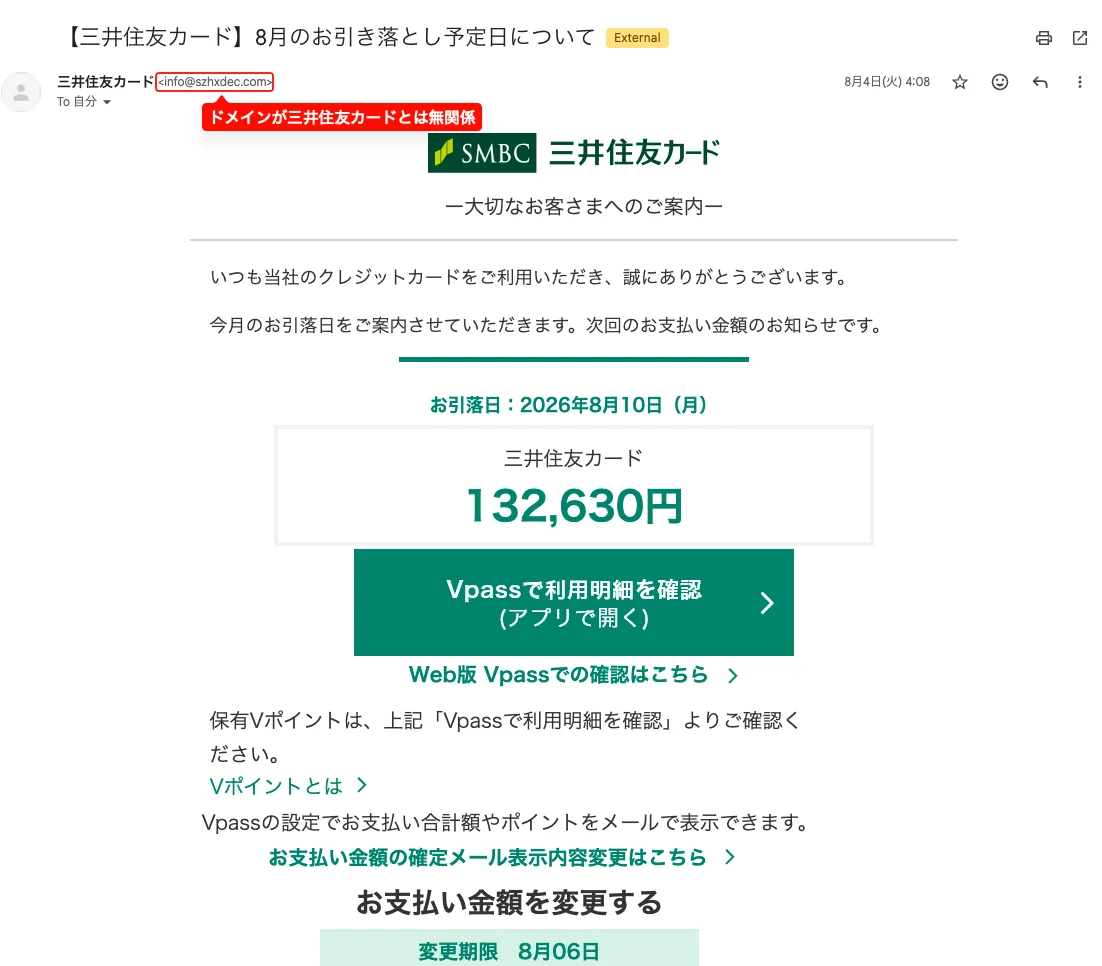
An email received in August 2026 posing as a Sumitomo Mitsui Card “upcoming debit date” notice (in Japanese). The logo, amount and buttons all look genuine, but the sender’s domain has nothing to do with Sumitomo Mitsui Card. - Even if the sender is genuine, don’t use the links in the email
Checking the sender is not always enough. Some scams have grown more sophisticated, such as abusing the invitation links of legitimate services.
If you are unsure whether the sender is genuine, don’t click the link. Check through the official app, a bookmark, or a phone number you already have on file. That way you don’t have to judge the sender at all.
4. What our review found, and what we fixed that day
Our review found the five issues below. All of them are easy to miss, even for a company that specializes in this. SPF is “the list of servers allowed to send”, DKIM is “the email’s digital signature”, and DMARC is a statement of “how the receiver should treat email that fails authentication”.
| Issue | What could happen | Fix |
|---|---|---|
| No DMARC | Receivers have no basis for rejecting fake emails that claim to be from our domain | Set up, and being tightened in stages |
| DKIM (digital signature) was not our own domain’s | Receivers cannot confirm the email really came from our company | Enabled DKIM for our domain in Google Workspace |
| Email sent from web forms etc. (via AWS SES) had no signature for our domain | Tightening DMARC as is would stop our own form notification emails from arriving | Enabled signing for our domain in SES too |
| SPF still listed the IP of a server used for testing during development | Whoever obtains that IP could send email that passes as a “legitimate sender” | Removed from SPF |
| All five of Gmail’s “Spoofing and authentication” protections were off (the default) | CEO impersonation, lookalike domains and spoofing of our own domain get delivered as is | Turned on all five |
Three points to keep in mind when setting these up:
- Before tightening DMARC, make sure every sender for your domain signs its mail: if web forms, booking systems or anything else outside Google Workspace sends mail in your domain’s name without a signature, tightening DMARC will stop your own email from arriving. We added SES signing first and are tightening DMARC in stages
- Don’t leave unused senders in SPF: a cloud IP you have released can be reassigned to someone else, and if it is still listed, mail from that IP can pass as “legitimate”
- Gmail’s spoofing protections are off by default: set them in the Admin console under Apps → Google Workspace → Gmail → Safety → Spoofing and authentication. “Protect against spoofing of employee names” in particular works directly against CEO impersonation
SPF, DKIM and DMARC are published in DNS, so you can check them from outside without admin access (see the FAQ at the end for how).
5. Assume your own information has already leaked from some service you use
5-1. Make a leak harmless
We all use many online services, and it is no longer unusual for one of them to leak your name or email address. Since late September alone, leaks have been disclosed one after another in Japan and abroad (§1). None of the emails we opened this time contained my name or address, but I assume my own information has leaked from some service somewhere. It would be no surprise to receive phishing that gets my name and even an order number right. Correct details are no longer proof that an email is genuine. So, to make a leak harmless, these are the three things I actually do:
- Sign in with Google or GitHub, and always use two-step verification: wherever a service allows it, I sign in with my Google or GitHub account, and those main accounts always have two-step verification. A leaked password alone is not enough to get in
- Close accounts on services I no longer use: every account left open is more information that can leak and another way in
- Keep track of the accounts that matter: which services I am registered with, under which email address and sign-in method, and whether two-step verification is on
5-2. Learn from what slips through
The more leaked information is put to use, the more will get past both settings and AI. So we decided that what Google catches goes to the spam folder (fine to be deleted after 30 days), and what slips through gets a label and is kept as training material. What collects under that label is what even the latest filters could not stop: the most dangerous scams of the moment.
We sort what collects there by type of scam with AI, share it internally, and learn it. If you remember how a scam unfolds, you will notice it even when the wording changes.
Afterword
MOOBON holds ISMS (ISO/IEC 27001) certification. In managing it, too, we are bringing in a process where Claude Code carries out the checks and the results are kept as logs, as part of our ongoing work to ensure our security. This article is what we learned from one of those efforts: sorting our phishing email.
Because we could hand the time-consuming research and classification to AI, we were able to finish reviewing our settings the same day. We hope our efforts are useful to someone, even a little.
For security reviews that also cover AWS and web systems, you can consult us through our free security assessment. For how we work with AI, see also our related article Ditching IAM Users in AI-Driven Development: AWS SSO + AssumeRole.
References
- Council of Anti-Phishing Japan, “Phishing Report 2026” (in Japanese)
- Council of Anti-Phishing Japan, alerts (in Japanese)
- piyolog, summary of the ransomware attack on IDCF Cloud (October 8, 2026, in Japanese)
- The Record, “Arizona courts say hackers stole info on more than 1.3 million people” (October 7, 2026)
- Anthropic Privacy Center, “Is my data used for model training?”
- INTERNET Watch, Tokyo Metropolitan Police Department warning about CEO fraud (in Japanese)
- Tochigi Prefectural Police, “Beware of fake CEO scams” (in Japanese)
Frequently Asked Questions
QCan I check on my own whether my domain has SPF, DKIM and DMARC set up?
Yes. All three are published in DNS, so you can check them from outside without access to any admin console. In a Mac or Linux terminal, "dig +short TXT yourdomain" shows SPF (the line starting with v=spf1), and "dig +short TXT _dmarc.yourdomain" shows DMARC (the line starting with v=DMARC1). An even easier way is to open an email sent from your company with Gmail's "Show original" and check that SPF, DKIM and DMARC each say PASS.
QIf we use Microsoft 365, are there similar settings?
Yes, Microsoft 365 also has settings that protect against spoofing and phishing. The features available depend on your plan, so the first step is to ask your administrator to check that they are not still at their defaults. SPF, DKIM and DMARC are set in your domain's DNS, so you check them the same way as with Google Workspace.
QIsn't it a data-leak risk to let AI go through your inbox?
It does require care. We use Claude on the Team plan for businesses, under which inputs are not used to train AI models by default. On top of that, we limit the AI's work to searching, classifying and labeling emails, and anything that cannot be undone, such as deleting, is done only after a person has checked it. If your internal rules or contracts with clients define what information may be given to AI, stay within those limits.