Introduction: Inheriting Infrastructure That Hadn't Been Updated in Years
The subject is a video streaming service for VR. Content is registered through an admin panel and delivered via an API to an installable VR player client, and the video library itself amounts to roughly 1.7TB across 3,200+ titles. The stack was CentOS 7 / PHP 7.2 / CakePHP 3.6 / MySQL 5.7, every piece of it past end of life (EOL). One glance was enough to see that the OS, the language, and the framework had all gone years without an update.
The video files, on the other hand, kept growing. The EBS volume had been expanded to 2TB, and about 1.7TB of it was video. Perhaps because of the sheer data volume, no backups were being taken. On top of that, MySQL on RDS had never been upgraded either, and the life-extension fee (Extended Support) for staying on 5.7 after standard support ended was piling up to a hefty sum every month.
This article documents how we took this long-neglected infrastructure and brought it up to a level where it can be run sustainably, while keeping costs down. Getting off EOL, stabilizing the system, and cutting costs all happen in a single architectural change. In the next section, we start by reading through where the money was actually going, straight from the invoice.
The savings and monthly costs in this article are estimates (projections). We will update them with actual numbers once the cutover, storage-tier optimization, and removal of old resources are complete. Client names, domains, bucket names, IP addresses, and other identifying details have been redacted.
1. Breaking Down the Invoice: Pinpointing Three Sources of Waste
It's quickest to just show you the real thing. This is a screenshot of the April 2026 bill (charges by service): $1,305.58 before tax and $1,436.14 including tax (about ¥230,000 at ¥160/$).
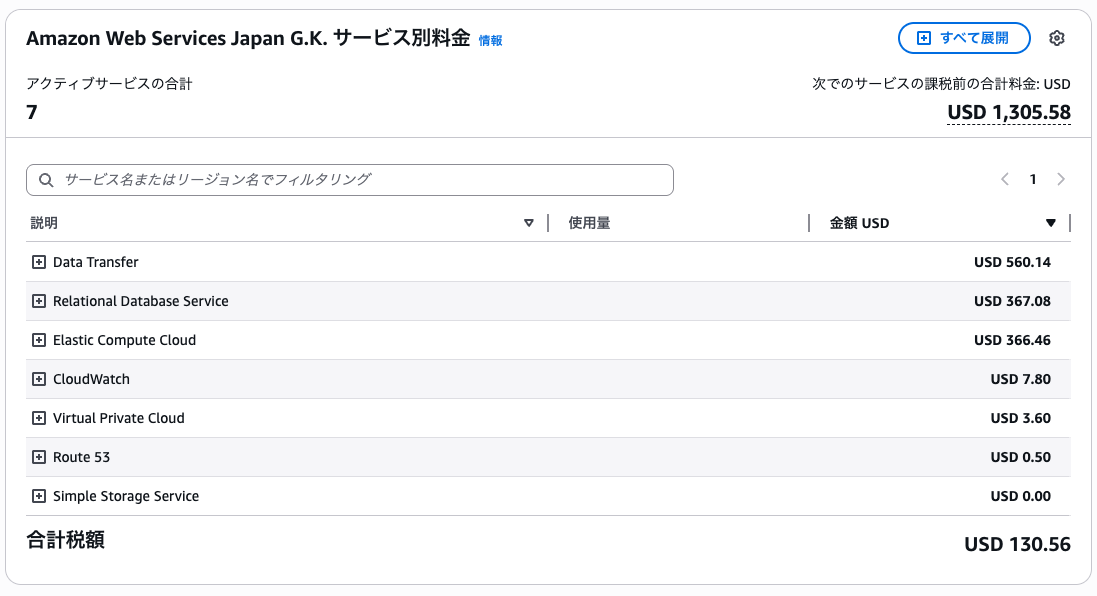
Service names alone, though, don't tell you what is being transferred or why the database costs this much. Once we traced what was behind each line item, three sources of waste worth cutting came into sharp focus.
① Delivery egress (Data Transfer)
$560/month · over 40% of the billVideos were served directly from EC2 to viewers, so transfer charges stood out by a wide margin. The biggest line item and the main target.
Move delivery to a low-cost CDN (Bunny.net) to compress transfer costs, and absorb origin fetches within CloudFront's free tier (1TB/month).
② RDS life-extension fee (Extended Support)
$367/month (about $229 of it Extended Support)Most of it was the post-EOL Extended Support fee for MySQL 5.7. No redundancy was in use either, so the cost was way out of proportion to the actual database workload.
Co-locate the database on EC2 and retire RDS.
③ EBS storage (bundled into EC2)
Included in EC2 $366/month · 2TB EBS1.7TB of video sat on a 2TB EBS volume (90% full and about to run out of space). It's billed under EC2 together with the instance charges.
Keep video files in S3 and shrink EBS to the bare minimum.
2. Cloning and Upgrading the VR Video Service on EC2 (Amazon Linux 2023)
Rushing into production changes for the sake of cost savings is dangerous. So we left the old production environment completely untouched, cloned the entire VR video service onto a new EC2 instance, and did all the upgrading and testing on the new side. With old and new running side by side, we could fall back to the old one at any time (no downtime, nothing broken). The project is split into three phases, and this section covers Phase 1: cloning and upgrading the platform.
- Phase 1 (this section, platform refresh): Clone the system onto a new EC2 instance (Amazon Linux 2023 / Graviton) and upgrade PHP / CakePHP / the database to eliminate every EOL component.
- Phase 2 (delivery optimization): Offload videos and images to S3 and serve them through a CDN (Section 3 onward).
- Phase 3 (cutover and teardown): Switch production by reassigning the Elastic IP → monitor for a few days → delete the old EC2 / RDS / surplus EBS to lock in the savings.
Building the New Server on Graviton + Amazon Linux 2023
The new server runs Amazon Linux 2023 on Graviton (ARM / t4g), replacing the previous-generation t2.small with a cheaper, more efficient instance. We set up swap and installed nginx / PHP 8.2 / MariaDB 11.4 as middleware. From the OS through the language and framework, we jumped the entire EOL stack straight to currently supported versions.
Replicating the Database from RDS to a Local MariaDB on the Same EC2 Instance
We replicated every database from RDS into a local MariaDB running on the new EC2 instance. After the migration, we compared row counts for every table between old and new to confirm they matched, and upgraded the character set to utf8mb4. We also put daily backups + restore tests in place.
Retiring RDS was possible because the service never used managed HA such as Multi-AZ, and the production database held only a few MB of real data. We were paying Extended Support on an RDS instance whose redundancy features did nothing for us, so we folded it into a local database. The automated backups / PITR we gave up are covered by the in-house backups described above (backups had actually stopped entirely before we started, so this was really a rebuild of the recovery process).
Upgrading the App from CakePHP 3.6 → 4.6 / PHP 7.2 → 8.2
The cloned app went through a major version jump: CakePHP 3.6 → 4.6 and PHP 7.2 → 8.2. We worked through the breaking changes (template structure, authentication, routing, ORM / Query API, error handlers, image processing, and more) step by step. For API authentication (JWT), we replaced an unsupported legacy plugin with firebase/php-jwt plus a custom adapter. The key point here is that we didn't change a single API URL or response, so the VR player clients, which can't be updated, would be unaffected.
Not Touching the URL / API Contract at All
The biggest constraint was that we could not change the …/upload/… URLs and API responses referenced by VR player clients that are already installed and can't be updated. So we route requests to the delivery target inside the server (nginx) and leave the URLs returned by the app as they are. That gives us the ability to swap delivery targets without affecting clients. This decision to keep things loosely coupled is what later let us swap delivery targets (Section 3 onward) without touching the app.
3. Three Delivery Targets: S3 + CloudFront → R2 Rejected → Bunny.net
Delivery cost (egress) was the biggest cost driver, so that's what we went after. This is where the real trial and error began. In the end, the delivery target changed three times.
We added a CDN, and delivery costs didn't go down
First, we took the obvious route and put a CDN in place with S3 + CloudFront. This did help: moving the videos to S3 let us shrink EBS, and egress within CloudFront's free tier (1TB/month) became free.
The problem was scale. This service pushes over 4TB of delivery egress per month, far beyond the 1TB free tier. For the overage, CloudFront's egress rate for Japan (Asia Pacific) is about $0.114/GB, practically the same as serving directly from EC2. Caching cuts round trips to the origin, but the egress to viewers is billed just the same.
In other words, we trimmed EBS and got the free-tier portion, but the reduction in the main target (delivery egress) was limited. To really bring delivery costs down, we needed a separate delivery target with a fundamentally lower egress rate.
Drawn in by free egress, we got as far as testing, then the terms of service stopped us
Next we looked at Cloudflare R2. Egress is free (you pay only for storage and operations), and because it offers an S3-compatible API, the app's storage code only needs a different endpoint. We actually completed an end-to-end test from migration through playback (including partial fetches via Range requests and preservation of Japanese file names).
But when we read the terms closely before going to production, we found that the Self-Serve terms include a clause restricting disproportionate, large-volume delivery of non-HTML content such as video without a separate agreement. Whether we could permanently serve ~4TB/month of video was open to interpretation. We asked support, but they wouldn't say definitively whether it was a violation or perfectly fine.
We treated the lack of a clear answer as a risk in itself and passed on R2 for production. Avoiding the business risk of having delivery shut down outweighed the short-term benefit of free egress. Settle terms-of-service gray areas before going to production: that was our second lesson. The assets we built while testing R2 (ownership checks, Range delivery tests, transfer procedures) carried over directly to the next option.
A CDN that explicitly permits video delivery in its terms, with low transfer rates
We ultimately chose Bunny.net. The deciding factors were:
- Its terms explicitly permit video delivery (clearing the issue that tripped us up with R2).
- Very low transfer rates (the cheapest tier, Volume Network, is $0.005/GB at a single worldwide rate).
- It supports persistent storage (Perma-Cache), minimizing repeat fetches from the origin.
- It can be introduced without a custom domain or any DNS changes, keeping migration risk low.
4. Final Architecture: Bunny × CloudFront Origin × Perma-Cache
Where we landed is a three-tier architecture with clearly separated roles. Putting CloudFront in front as Bunny's origin may look like a detour at first, but it brings two advantages.
[Viewer / VR app]
        │  https://…/upload/… (same URLs as before)
        ▼
[Bunny.net CDN]    … delivery to viewers. Low cost, persisted with Perma-Cache
        │  (fetched only when Bunny doesn't have it)
        ▼
[Amazon CloudFront] … fetch gateway. Nearly $0 within the AWS free tier (1TB/month)
        │
        ▼
[Amazon S3]        … single source of truth for videos/images (the persistent store)
The Role of Each Tier
| Tier | Role |
|---|---|
| S3 = source of truth | Upload destination for the app. The only persistent store; this is the sole authoritative copy of the data |
| CloudFront = fetch gateway | The path Bunny uses to fetch from S3. Fits within the AWS free tier of 1TB/month, so it costs nearly $0 |
| Bunny.net = delivery to viewers | Serves content at low egress rates. Fetched videos are persisted in Perma-Cache |
How It Works (Lookup Order)
Viewer requests are resolved in the following order, top to bottom.
- On a HIT at the Bunny edge, it's served immediately.
- On a MISS, it's served from Perma-Cache if the file is there.
- If it's in neither, Bunny fetches it from S3 via CloudFront and persists it in Perma-Cache. From then on, that file is never fetched from the origin again (essentially one fetch per file).
Why Keep S3 + CloudFront in the Picture?
Delivery itself is left to Bunny. Honestly, running everything on Bunny.net alone would make for a simpler setup. We still keep S3 and CloudFront behind it (as the origin) because we believe holding the master copies of the videos on the AWS side (S3) is the more trustworthy backup. S3 is the only persistent store (the source of truth), and Bunny and CloudFront are strictly disposable caches. With all data anchored in S3 alone, anything lost from a cache can be rebuilt from S3.
That said, we wanted to avoid exposing S3 directly to the internet (to prevent unintended access and unnecessary egress charges). So S3 keeps public access blocked, and CloudFront is the only gateway allowed to fetch from it. Storage (S3) and retrieval (CloudFront) have separate roles, and CloudFront gets to use the AWS free tier (1TB/month). This S3 + CloudFront pair also doubles as a fallback path holding every video: if Bunny.net has an outage, we just switch the nginx configuration.
Why Use CloudFront as the Origin Instead of S3 Directly?
This is the crux of the architecture. Putting CloudFront in as Bunny's origin yields two advantages.
Origin fetches cost effectively nothing
The traffic Bunny pulls from the origin is absorbed by the CloudFront free tier (1TB/month). Thanks to Perma-Cache, each file is fetched essentially once, so fetch traffic stays within the free tier and costs close to $0.
The failover target is continuously validated
Since Bunny → CloudFront → S3 fetches run every day under normal operation, the failover target (serving directly from CloudFront) keeps being validated by real traffic. The "we switched over and it didn't work" scenario is ruled out by design.
Why No Bulk Migration or Sync Is Needed: Pull, Not Push
This origin setup (making CloudFront Bunny's fetch source) has one more big advantage beyond cost: by design, there is no need to move every video to Bunny up front, nor to sync each new file to Bunny. With the traditional approach of pushing everything to a Bunny Storage Zone, that wouldn't be the case.
- ① No up-front bulk migration: A push approach means transferring 1.7TB in one go (roughly $200 in egress = 1.7TB × $0.114/GB). With pull + Perma-Cache, content is filled in on demand via CloudFront as it gets accessed, each month stays within the 1TB free tier, and the cost is effectively $0. Videos nobody ever watches are never pulled, so they incur neither transfer nor storage.
- ② No syncing of new files: A push approach requires a sync batch or dual writes so that every upload lands in both S3 and Bunny. With pull, once a file is in S3, Bunny fetches it automatically on first access. That's one less moving part to operate, and missed or failed syncs simply can't happen.
| Approach | Initial transfer | New uploads | Cold videos (never watched) |
|---|---|---|---|
| Push (everything to Bunny Storage) | 1.7TB in one go (roughly $200 in egress) | S3 ↔ Bunny sync required every time | Everything stored (paying to store unwatched videos too) |
| Pull + Perma-Cache | None (on demand as accessed, effectively $0 within the free tier) | Automatic (fetched on first access), zero effort | Never pulled = no transfer and no storage |
Bunny.net Configuration
| Setting | Value |
|---|---|
| Pull Zone | Volume Network selected (cheapest tier, 10 PoPs, single worldwide rate of $0.005/GB) |
| Replication | None (single region in Singapore, zero replicas to minimize cost) |
| Origin | CloudFront URL (https://xxxxxxxx.cloudfront.net) |
| Perma-Cache | Enabled |
When you set CloudFront as the origin, the key is to make the Host header match the distribution's domain (if it doesn't match, CloudFront returns a 403).
5. End-to-End Test: Verifying MISS → Pull → HIT with a 760MB Video
With the architecture in place, we ran real data through it end to end. We deliberately picked a demanding file, a 760MB video that had never been fetched, with a Japanese file name containing spaces, so that a single run would exercise every branch of the lookup path.
| Behavior tested | Result |
|---|---|
| First access (not yet fetched) | MISS → CloudFront pull → fetched from S3 → 200 OK |
| Mid-stream playback (seeking) | 206 Partial Content for Range requests / correct Content-Range |
| Repeat access | HIT (served directly from Bunny) |
| Persistence | Confirmed the file was actually written to Perma-Cache |
| Japanese name + spaces | Served correctly, URL-encoding concerns included |
We confirmed the whole chain in one pass: MISS → pull → 200, Range → 206, HIT on repeat access, and the file actually materializing in Perma-Cache. Partial fetches (206), which seek playback depends on, work, and Japanese file names don't break anything. With that, all the prerequisites for going to production were in place.
__bcdn_perma_cache__/…) or look at HIT/MISS on delivery. Also note that partial fetches via Range (206) have been verified on Volume Network in practice, but this depends on Bunny's implementation. Since 206 is critical for seeking in VR playback, we recommend re-verifying it periodically in case the behavior changes.6. Cost Estimate: Cutting the Monthly Bill by Compressing Bandwidth Costs
Adding up all the changes so far, the projected monthly cost looks like this. "Before" is the actual April 2026 bill, and "New setup" is an estimate assuming 4TB/month of delivery and 1.7TB of storage (at ¥160/$; actual costs vary with traffic).
| Item | Before | New setup |
|---|---|---|
| Video delivery (transfer / egress) | Data Transfer $560 (about ¥90,000) | About ¥5,000/month (Bunny Volume Network $0.005/GB, ~90% reduction) |
| Bunny storage | ─ | About ¥2,500/month (1.7TB, Singapore only) |
| CloudFront | ─ | Nearly ¥0 (absorbed by the 1TB/month free tier) |
| S3 storage | (bundled into old EBS) | About ¥3,600/month (assuming Infrequent Access) |
| RDS (database) | $367 (incl. $229 Extended Support, about ¥59,000) | Retired (moved to local MariaDB) |
| EC2 (server) | t2.small + EBS $366 (about ¥59,000) | Upgraded to Graviton (t4g) |
| Other (CW / VPC / Route 53 / tax) | About ¥23,000 | Negligible |
| Total | About ¥230,000 incl. tax (April 2026) | Under ¥20,000/month (estimate) |
The biggest reason costs drop is the difference in unit prices. For delivery egress and storage in particular, just changing where you serve from and where you store things changes the per-GB price by an order of magnitude (all figures approximate).
| Unit price (approx.) | Before | New setup |
|---|---|---|
| Delivery egress (transfer) | CloudFront / EC2 direct ≈ $0.114/GB (Tokyo) | Bunny Volume Network ≈ $0.005/GB (single worldwide rate) ── about 1/20 of CloudFront |
| Storage | EBS gp2 ≈ $0.12/GB-month | S3 (IA) ≈ $0.014/GB-month / Bunny storage ≈ $0.01/GB-month |
* The RDS Extended Support fee (roughly $229/month) and the previous-generation EC2 were cut not through lower unit prices but by retiring and replacing them.
* Unit prices are approximate as of June 2026 (CloudFront: first tier, up to 10TB/month; Bunny: Volume Network). Prices are subject to change.
Where we landed: a drastically smaller monthly bill (~90% reduction, estimated)
The AWS bill for April 2026 was $1,436 including tax (about ¥230,000 at ¥160/$, or about ¥210,000 before tax). With the changes above, the estimate comes in at under ¥20,000/month. That's a reduction of roughly 90%, or savings on the order of ¥1 million per year.
The savings come down to three things: ① moving delivery egress to a low-cost CDN for a ~90% cut, ② eliminating the RDS Extended Support fee, and ③ replacing the previous-generation EC2 with Graviton. We will update with final figures once the production cutover, S3 tier optimization, and removal of old resources are complete.
7. Operations: Upload / Update / Delete / Backup
Alongside cost, the other outcome is that day-to-day operations now run smoothly without strain. From upload to deletion, each operation completes automatically.
| Operation | Flow |
|---|---|
| New upload | App → S3. Bunny fetches and persists it automatically on first access (no up-front bulk copy needed) |
| Update (replace) | Register as new and switch the reference. Videos are managed under fixed, unique paths and never overwritten, so a replacement always gets a new path and never collides with old cache entries (no purge needed) |
| Delete | Deleting in the app removes the file from S3 and purges it from Bunny by URL. Anything missed is swept up by a cleanup batch |
| Warm-up | Browsing the site caches thumbnails, and playback caches videos, in Bunny (automatic; a bulk warm-up before cutover is also possible) |
| SSL certificate | Wildcard certificate renewed manually a few times a year (set up so the new server can renew it on its own) |
| Backup | Daily database backups. Master copies of videos live in S3 (to be moved to a long-term archive tier later to preserve originals) |
The purge on deletion has safeguards built in. If credentials aren't configured, it does nothing (no-op), and if a purge fails it just logs the error and never blocks the deletion itself. Since anything missed can be swept up by the cleanup batch, the update and delete flows for delivery won't fall apart in day-to-day operations.
8. Failover and Instant Rollback
- If the CDN (Bunny) goes down: A single server-side setting change instantly switches delivery from Bunny → CloudFront direct. CloudFront + S3 hold all content, so every video keeps streaming without interruption. Switching back is just as instant.
- The failover target is always validated: As mentioned, Bunny fetches through CloudFront even under normal operation, so the failover target is continuously exercised by real daily traffic.
- No risk of data loss: For persistent storage, S3 alone is the source of truth, and CloudFront / Bunny are disposable caches. Whether cached content disappears or is deliberately cleared, it is regenerated from S3.
- Server cutover: Switching production servers over and back is just a matter of reassigning the Elastic IP. No DNS changes are involved, so rollback is instant.
By building no downtime, easy rollback, and no data loss into the architecture itself, rather than just "delivering cheaply," we achieve cost reduction and stability at the same time.
9. Lessons Learned and Pitfalls
- Break the invoice down before you read it: Service-level totals won't show you where to cut. Only by tracing what's behind each line item (what kind of transfer, what the database charges are actually for) does the real picture emerge: transfer, storage, and Extended Support fees.
- Adding a CDN doesn't automatically lower costs: Caching reduces origin round trips, but egress to viewers is still billed by the CDN. Look at the pricing structure and check whether it actually moves the main cost driver.
- Settle terms-of-service gray areas before production: Even with a tempting short-term benefit like free egress, support refusing to give a clear yes or no is a business risk. Stopping on terms-of-service grounds is a valid decision even after testing passes.
- Putting a free tier in front of the origin has two benefits: Making CloudFront Bunny's origin absorbs fetches within the free tier while continuously validating the failover target.
- Loosely coupled URLs make swapping easy: Because the delivery target wasn't hard-coded into the app's URLs and was routed inside the server instead, we could replace the delivery platform without touching the app.
- Long-running batches die when the session drops: For long-running jobs like syncing 1.7TB, the OS may clean up the process the moment the SSH session disconnects. Make it durable by enabling lingering or running it as a systemd unit (if the sync is idempotent, it can resume).
- Prevent cache incidents with a "never overwrite" design: Managing files under fixed, unique paths and giving replacements a new path means updates take effect without purging, which makes cache-related incidents much less likely.
Afterword
At its core, this project was about the unglamorous work of breaking down the invoice, finding the real waste, and migrating without downtime. For services dominated by delivery egress, like video streaming, simply adding a CDN won't lower the bill. Only by going as far as examining the pricing structure and rethinking the delivery target itself did we arrive at an estimate that brings the AWS bill under ¥20,000 (roughly a 90% reduction from the April 2026 actuals).
At the same time, we tackled eliminating EOL components, fixing the root cause of the disk running out of space, rebuilding the backup process, and designing a cutover that can be rolled back instantly, all in one go. Cost reduction and stabilization aren't separate efforts; they can be achieved together through a single design. If you'd like an AWS operating-cost assessment or architecture review, feel free to reach out via the AWS Cost Analysis Tool or at info@moobon.jp.
The figures in this article are estimates. We plan to update them with final numbers once the production cutover, storage-tier optimization, and removal of old resources are complete.
Frequently Asked Questions
QWon't putting a CDN (CloudFront) in front of the videos bring delivery costs down?
Caching does reduce round trips to the origin (S3 or EC2), but the last hop to the viewer (egress) is still billed per GB by the CDN. CloudFront's egress rate for Japan (Asia Pacific) is roughly on par with serving directly from EC2, so for a service where delivery is the biggest cost driver, you can end up with "we added a CDN and the bill didn't budge." That was the starting point of this project.
QWhy didn't you adopt Cloudflare R2?
Free egress made R2 very attractive, and we took it as far as an end-to-end test of migration and playback. However, the Self-Serve terms contain a clause restricting large-volume delivery of non-HTML content such as video without a separate agreement, and whether we could permanently serve ~4TB/month of video in production was a gray area. Support couldn't give us a clear yes or no, so we judged it a business risk, passed on R2 for production, and chose a service whose terms explicitly allow video delivery. The lesson: get the terms of service settled before you go to production.
QWhy is Bunny.net's origin CloudFront rather than S3?
Two reasons. First, the traffic Bunny pulls from the origin fits inside AWS's CloudFront free tier (1TB/month), which makes origin fetches effectively free. Second, because Bunny → CloudFront → S3 fetches run every day under normal operation, the failover target (serving directly from CloudFront) is continuously validated by real traffic. That rules out the "we switched over and it didn't work" scenario.
QHow is Perma-Cache different from a regular CDN cache?
A regular edge cache evicts content based on expiry or access frequency, whereas Perma-Cache persists a file in storage once it has been fetched. As a result, each file is pulled from the origin essentially once, and after that Bunny never goes back to the origin (CloudFront/S3) for it. For workloads that repeatedly serve large video files, this minimizes both load and cost on the origin side.
QIs it really safe to drop RDS and run a local database?
The service never used managed HA such as Multi-AZ in the first place, and the production database held only a few MB of actual data. Since RDS's redundancy features weren't being used, we consolidated onto a local database (MariaDB) on the same server. The automated backups / PITR we used to get from RDS are replaced by our own daily backups plus restore tests. For workloads that genuinely need redundancy, staying on RDS is still the right call.
QHow risky is the production cutover?
We left the old production environment completely untouched and built the new one in parallel. Switching servers over and back is just a matter of reassigning an Elastic IP, so we can roll back instantly without any DNS changes. Switching the delivery target (Bunny/CloudFront) is a single server-side setting, with no application changes or redeploys. The master copies of the videos live only in S3 and the CDN is treated as a disposable cache, so there is no risk of data loss either.