1. What NAT Gateway Does and How It's Priced
NAT Gateway is AWS's managed NAT appliance. You place it in a public subnet and associate an EIP with it, and it sends outbound internet traffic from private subnets out to the internet using that EIP as the source IP. AWS takes care of availability, and the SLA is at managed-service level. Configuration is light, and if you deploy one per AZ it can even ride out an AZ failure. Functionally, it's the textbook choice and hard to fault.
On the other hand, its pricing has two tiers, and as you keep running it, the monthly bill quietly creeps up.
1-1. Unit prices (Tokyo, as of May 2026)
| Charge | NAT Gateway (one) |
|---|---|
| Hourly charge | $0.062/h ≈ $45/month |
| Data processing charge (traffic through NAT) | $0.062/GB |
| EIP (one, public IPv4 charge) | $0.005/h ≈ $3.65/month |
| Subtotal (hourly + EIP, excluding traffic) | $48+/month |
The key point is that you pay both the hourly charge ($0.062/h) and the data processing charge ($0.062/GB). The hourly charge alone would only be $45/month, but the data processing charge scales with the volume of traffic flowing out of ECS and other systems. Another common pain point is that in a multi-AZ setup, you pay the full $45+/month times the number of AZs.
* Prices are estimates based on AWS's published pricing (Tokyo, as of May 2026) and are subject to exchange rates and revisions. Check the official AWS pricing page for the latest figures.
2. MOOBON's Actual NAT Gateway Bill
We used Cost Explorer to see how the unit prices from §1 actually added up for us. The figures below are filtered to the single AWS account that owns the VPC covered in this article, extracting APN1-NatGateway-Hours (hourly charge) and APN1-NatGateway-Bytes (data processing charge).
| Month | Hourly charge | Data processing | Total |
|---|---|---|---|
| 2025-10 | $46.13 | $65.92 | $112.05 |
| 2025-11 | $44.64 | $62.27 | $106.91 |
| 2025-12 | $46.13 | $62.14 | $108.27 |
| 2026-01 | $46.13 | $62.90 | $109.03 |
| 2026-02 | $41.66 | $66.44 | $108.10 |
| 2026-03 | $45.20 | $66.13 | $111.33 |
| 2026-04 (after migrating to fck-nat) | $0 | $0 | $0 |
The six-month average came to $109/month ($45 hourly + $64 data processing). What surprised us was that the data processing charge was larger than the hourly charge. Contrary to the vague assumption that "NAT Gateway is mostly an hourly cost," the traffic side turned out to be the bigger factor in practice.
2-1. What was going through NAT
Cross-referencing with other USAGE_TYPEs in Cost Explorer, the breakdown of the 1,004 GB that passed through NAT (and produced that $64/month) looked roughly like this:
- About 650 GB to internal AWS APIs (about 65% of the total, roughly $40 in charges): traffic to services without an Interface Endpoint, such as CloudWatch Logs (
awslogs), Secrets Manager, SSM Parameter Store, and the ECR metadata API. It isn't billed asAPN1-DataTransfer-Out-Bytes(internet egress), but it still goes through NAT Gateway, so data processing charges apply - About 354 GB to external SaaS / APIs (about 35% of the total, roughly $22 in charges): the external traffic that actually requires the static IP, which is the real purpose of the setup. This is also billed as
APN1-DataTransfer-Out-Bytes
Pinpointing exactly how much came from Logs alone would require analyzing VPC Flow Logs, but since the ECS awslogs driver constantly writes to the Logs API during normal operation, we believe it accounts for a large share of the internal AWS API portion ($40). In reality, a constant trickle of traffic was steadily piling up data processing charges.
An S3 Gateway Endpoint can be added to a VPC at no extra cost and without affecting existing traffic, and it takes S3-bound traffic such as ECR layer pulls off the NAT path. Because it immediately cuts a high-volume portion of NAT data processing charges, if your VPC doesn't have one yet, add it before you even start evaluating fck-nat.
3. Why Use NAT Gateway Anyway: Static IP Requirements for ECS
So far we've seen that NAT Gateway is fairly expensive. So why can't ECS workloads just drop the NAT appliance? In most cases, the answer lies in the requirement to have a fixed outbound IP.
When an app running on ECS (Fargate / EC2) calls an external API, the other party sometimes asks you to "please use a fixed source IP." Depending on the industry, it's a standard prerequisite: payment processing and credit-check SaaS, data integration APIs, allowlists on third-party systems, and so on. In practice, requests to "pin the outbound IP" mostly boil down to the following three patterns.
3-1. IP allowlists on the destination SaaS / API
This is by far the most common pattern. Payment processors, credit-check SaaS, data integration APIs, and similar services have an operational rule that "source IPs must be registered in advance and added to an allowlist." Almost all of the destinations we route through NAT fall into this category.
- Changing the IP after registration requires work on the provider's side, so the IP is operated on the assumption that it will rarely change
- With ECS's dynamic IPs, you have to map them at the egress point, so you end up needing some kind of NAT appliance anyway
- A single static IP is often enough (two if you want redundancy)
3-2. Source auditing and compliance requirements
A common requirement in financial, healthcare, and public-sector systems: you want the source IP recorded in audit logs to be a static IP that your company controls. The goal is to make it possible, after the fact, to trace "which system communicated with which party", not only through access logs but also in combination with the SNI in the SSL/TLS Client Hello.
With this requirement, clear ownership of the IP (being able to trace it back to your company via Whois / the RIR) sometimes matters more than the number of IPs. If you use an AWS EIP, keep in mind that the Whois record for an EIP shows AWS as the owner. If you need your own company name in Whois, you'll have to go as far as BYOIP.
3-3. Getting registered on a partner's internal network allowlist
This covers connecting to a partner's VPN or internal network, or to an on-premises DB over a dedicated line. The partner registers your IP as an "allowed source IP" in their firewall / NACL. It's similar to pattern 1, but the crucial difference is that their internal approval process for registering an IP takes time, which tends to make IP changes an even bigger deal.
- How many static IPs you need (1 / 2 / more): this determines how much redundancy you need
- How much downtime you can tolerate (a few minutes of interruption is OK / not even one second of outage): this determines your architecture options
- The cost of coordinating an IP change with external parties (handled in-house / requires an application / takes weeks): this determines whether to adopt the automatic EIP reassignment described later
4. Options That Balance Cost Savings and a Static IP
Given the monthly cost of NAT Gateway (§1, §2) and the reasons a NAT appliance is still needed (§3), the question narrows down to "how to achieve both cost savings and a static IP." Realistically, the main candidates are NAT Gateway or EC2 NAT (fck-nat / AlterNAT), and this article proceeds on the basis of those two approaches.
4-1. EC2 NAT (DIY / fck-nat / AlterNAT)
In this setup, a single EC2 instance runs as a "NAT appliance": it sits in a public subnet with an EIP attached, and the private subnet's route table points 0.0.0.0/0 → at its ENI. fck-nat packages this as a preconfigured AMI, while the AlterNAT approach adds a pattern of running your own NAT as the primary and failing over to NAT Gateway on failure (it runs on the cheap self-managed NAT during normal operation and switches to the pricier NAT Gateway only during an outage, so you get both cost savings and SLA coverage).
- Strengths: fixed monthly costs drop significantly compared with NAT Gateway (see below). A single EIP gives you a static IP
- Weaknesses: in a single-instance setup, availability depends entirely on that one instance. Building proper HA adds complexity (covered in §8)
- Ease of pinning the IP: ◎ The AMI comes with built-in support for automatically attaching the EIP to instances launched by the ASG
4-2. Comparison (Tokyo, as of May 2026, per gateway)
| Option | Static IP | Availability | Setup effort | Approx. monthly cost |
|---|---|---|---|---|
| NAT Gateway + EIP | ◎ | ◎ | Low | $48+ plus traffic charges |
| fck-nat (EC2) | ◎ | △(single instance if single-AZ) | Medium | $14–$18 |
4-3. fck-nat lets you pin the source IP and cut costs at the same time
At its core, fck-nat is an EC2-based NAT appliance with a single EIP attached. It meets the static outbound IP requirement just as well as NAT Gateway, and as a side benefit, it also delivers significant cost reduction compared with NAT Gateway.
From $109/month (NAT Gateway) to about $11/month (fck-nat): a saving of $98/month (about ¥14,700 at ¥150 per USD)
For the big picture on cost optimization, see our companion article How We Found and Recovered $310/Month in “Hidden Fixed Costs” on AWS.
5. What Is fck-nat? How It Works and What "fck" Means
5-1. The name: feasible cost konfigurable
The name may tempt you to read it as something a bit cheekier, but according to the official documentation it stands for feasible cost konfigurable NAT (spelling it konfigurable instead of configurable is wordplay to make the initials line up). The intent is "a configurable NAT at a feasible cost."
5-2. Under the hood: a preconfigured EC2 AMI
fck-nat is essentially an EC2 AMI based on Amazon Linux 2023 that comes with the following configured out of the box:
net.ipv4.ip_forward = 1(enables IP forwarding in the Linux kernel)iptables -t nat -A POSTROUTING -o ens5 -j MASQUERADE(rewrites the source IP to the NAT appliance's IP)fck-nat.service, which automatically runsAssociateAddressfor the EIP- (Optional) metrics shipping via the CloudWatch Agent
In other words, it's the NAT functionality already built into the Linux kernel, repackaged in a form that can be distributed as an AMI. There's no special software involved; everything stays within the world of iptables and sysctl.
fck-nat.service showing inactive is by designIf you run
systemctl is-active fck-nat after boot, it returns inactive. That's because it's a systemd unit written with Type=oneshot / RemainAfterExit=no, designed to attach the EIP and configure iptables at boot, then exit. Since the kernel itself handles NAT, traffic keeps flowing even after the service exits (in our production environment it has stayed inactive for more than two weeks while MASQUERADE-ing over 60 MB of traffic).5-3. AMI distribution and pricing
The fck-nat AMI isn't on AWS Marketplace. Instead, it's published from a dedicated AMI publisher account, 568608671756, which each AWS account references directly. The AMI itself is free; you only pay for the EC2 instance and EBS volume you launch from it.
- ARM: supports Graviton instances such as
t4g.nano(this is the cheapest option officially recommended) - x86_64: AMIs for the
t3 / t3a / t2families are also published - v1.4.0, released in January 2026 (the version we adopted), standardized on AL2023
Note that we chose the x86_64 t3a.micro to make use of spare Reserved Instances (for a new deployment, the cheapest recommended option, the ARM t4g.nano, is the sensible choice; see §6-5 Choosing the AMI for the background).
5-4. Why fck-nat was needed
AWS's official NAT instance AMI (amzn-ami-vpc-nat-*, based on Amazon Linux 1) has effectively gone unmaintained since AL1 reached end of life, and AWS now recommends NAT Gateway exclusively. In other words, the "self-managed NAT" option has dropped off the official roadmap. fck-nat is the open-source community filling that gap, and at its heart it's simple: it takes two things, a preconfigured AMI and automatic EIP attachment, and packages them as an AMI.
6. Setup: The Configuration MOOBON Uses
From here on, we walk through the fck-nat environment MOOBON actually runs, covering the network, IAM, Launch Template / UserData, and ASG in concrete detail. Resource IDs, project tags, and other identifying information have been masked, but the structure itself is unchanged.
6-1. Architecture overview
The resource map of the target VPC is shown below. It consists of three public subnets (10.0.0.0/24 / 10.0.1.0/24 / 10.0.2.0/24), two private subnets (10.0.10.0/24 / 10.0.11.0/24), two route tables (route-internet-gateway / route-moobon-private), one IGW, and an S3 Gateway Endpoint. The fck-nat instance is placed in moobon-public-10.0.0.0/24 (AZ ap-northeast-1a), and the 0.0.0.0/0 route from the private subnets points to the fck-nat ENI.
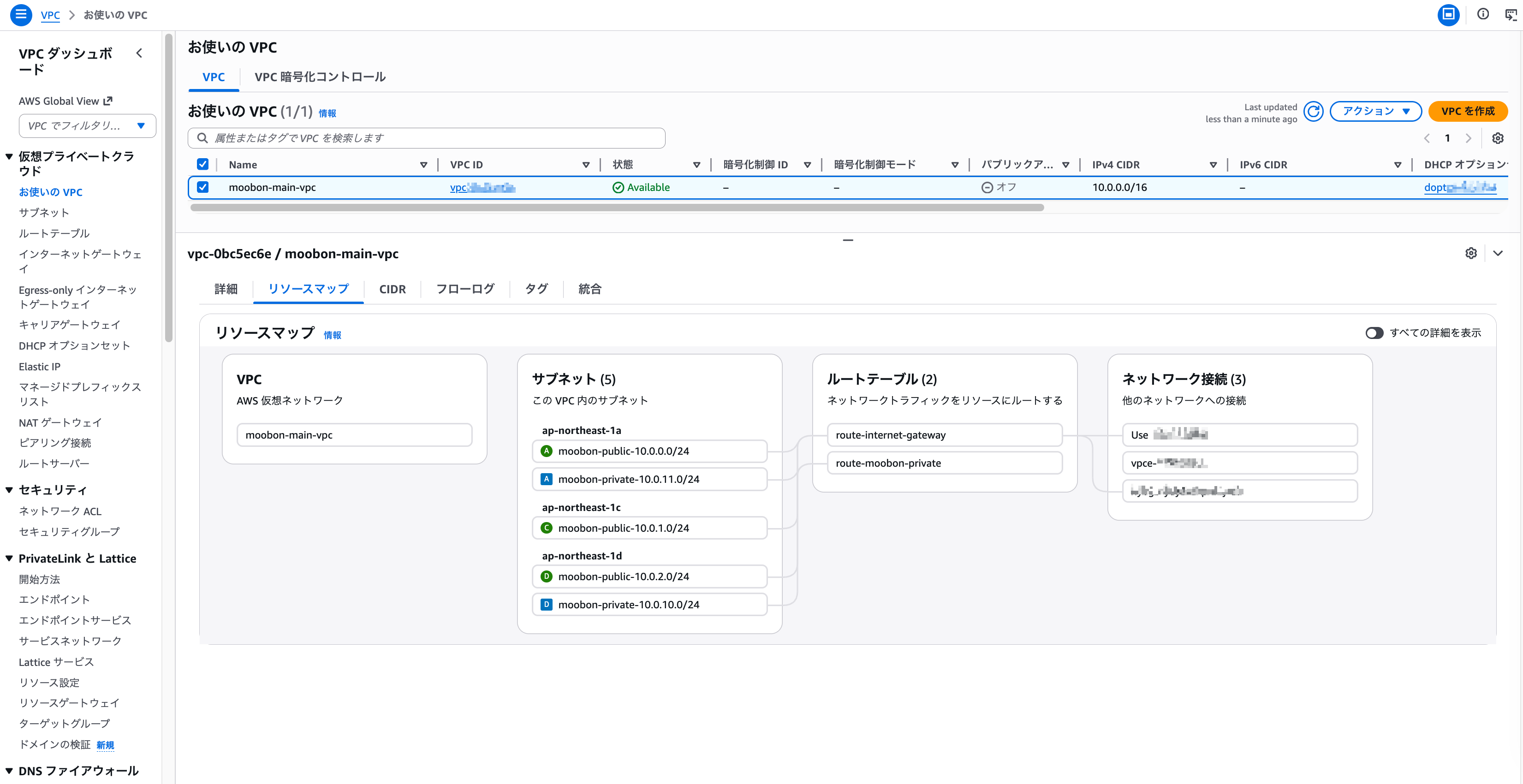
moobon-public-10.0.0.0/24 (AZ-1a).6-2. Network design (VPC / Subnet / Route Table)
The default route 0.0.0.0/0 for the ECS instances (placed in private subnets such as 10.0.11.0/24) points from the shared private route table to the fck-nat ENI. On boot, the fck-nat instance calls aws ec2 replace-route to set its own ENI in the route table, so the key point is that the route is updated the moment a new instance comes up.
VPC: moobon-main-vpc (10.0.0.0/16) ├── Public Subnets │ ├── moobon-public-10.0.0.0/24 (ap-northeast-1a) ← fck-nat here │ ├── moobon-public-10.0.1.0/24 (ap-northeast-1c) │ └── moobon-public-10.0.2.0/24 (ap-northeast-1d) │ └── Route Table: route-internet-gateway │ 0.0.0.0/0 → IGW └── Private Subnets ├── moobon-private-10.0.10.0/24 (ap-northeast-1d) └── moobon-private-10.0.11.0/24 (ap-northeast-1a) ← ECS instances here └── Route Table: route-moobon-private 0.0.0.0/0 → fck-nat ENI (replaced dynamically)6-3. Allocating and auto-attaching the EIP
Allocate one EIP to use as the fixed outbound IP, and write its allocation ID into fck-nat's /etc/fck-nat.conf. At boot, fck-nat.service reads this conf file and attaches the EIP to itself via AssociateAddress. Every time the ASG launches a new instance, the same EIP is automatically moved to the new instance, so the IP registered in the SaaS allowlist stays fixed.
# /etc/fck-nat.conf (masked) eip_id=eipalloc-XXXXXXXXXXXXXXXXX cwagent_enabled=true* Because the EIP always stays attached to the fck-nat instance, this setup never incurs the "idle EIP" charge that applies to unattached addresses. The only charge is the public IPv4 fee ($0.005/h ≈ $3.65/month; see the unit price table in §1).
6-4. IAM policy (EC2 permissions needed to run fck-nat)
The IAM policy required to run fck-nat is shown below. In addition to the managed AmazonSSMManagedInstanceCore policy (for SSM sessions), we scope EC2 API access with an inline policy. It's too loose to call "least privilege"; it follows the fck-nat project's recommended set (in practice, the cloud-config runcmd calls ModifyInstanceAttribute and ReplaceRoute, fck-nat.service uses AssociateAddress / DisassociateAddress for EIP operations, and the Describe* actions are for status checks).
{
  "Version": "2012-10-17",
  "Statement": [
    {
      "Effect": "Allow",
      "Action": [
        "ec2:AssociateAddress",
        "ec2:DisassociateAddress",
        "ec2:ModifyNetworkInterfaceAttribute",
        "ec2:ModifyInstanceAttribute",
        "ec2:ReplaceRoute",
        "ec2:CreateRoute",
        "ec2:DescribeAddresses",
        "ec2:DescribeInstances",
        "ec2:DescribeNetworkInterfaces",
        "ec2:DescribeRouteTables"
      ],
      "Resource": "*"
    }
  ]
}
We use Resource: "*" because the Modify* / Replace* APIs don't play well with resource ARN-based restrictions. If you want to lock it down properly, you can use an aws:ResourceTag condition to limit access to resources tagged Project = your-project, but in this article we prioritized ease of handling.
6-5. Choosing the AMI: t4g.nano is recommended, we use t3a.micro
fck-nat's official recommendation is the cheapest configuration, t4g.nano (ARM / Graviton), which brings the cost down to around $3/month. We went with t3a.micro (x86_64). The reason is simple: we wanted to make use of spare Reserved Instances.
For a new deployment, the ARM t4g.nano is the sensible choice. Even if you're copying our setup, choose ARM unless you have a specific reason not to. For reference, the AMI we adopted, as of this writing, is:
AMI ID: ami-06482499a24c86ab1 AMI name: fck-nat-al2023-hvm-1.4.0-20260126-x86_64-ebs Base: Amazon Linux 2023 Version: v1.4.0 (released January 2026) Publisher account: 5686086717566-6. Launch Template / UserData (current v6)
Here is the full UserData (cloud-config) of the Launch Template in production. A single file handles both automatic EIP attachment and rewriting the private route table's 0.0.0.0/0 to point at the instance's own ENI.
#cloud-config
write_files:
  - path: /etc/fck-nat.conf
    content: |
      eip_id=eipalloc-XXXXXXXXXXXXXXXXX
      cwagent_enabled=true
    owner: root:root
    permissions: '0644'
runcmd:
  - systemctl restart fck-nat.service
  - |
    TOKEN=$(curl -sX PUT "http://169.254.169.254/latest/api/token" \
      -H "X-aws-ec2-metadata-token-ttl-seconds: 300")
    INSTANCE_ID=$(curl -sH "X-aws-ec2-metadata-token: $TOKEN" \
      http://169.254.169.254/latest/meta-data/instance-id)
    REGION=$(curl -sH "X-aws-ec2-metadata-token: $TOKEN" \
      http://169.254.169.254/latest/meta-data/placement/region)
    MAC=$(curl -sH "X-aws-ec2-metadata-token: $TOKEN" \
      http://169.254.169.254/latest/meta-data/mac)
    ENI_ID=$(curl -sH "X-aws-ec2-metadata-token: $TOKEN" \
      http://169.254.169.254/latest/meta-data/network/interfaces/macs/$MAC/interface-id)
    aws ec2 modify-instance-attribute --region $REGION \
      --instance-id $INSTANCE_ID --no-source-dest-check
    aws ec2 replace-route --region $REGION \
      --route-table-id rtb-XXXXXXXXXXXXXXXXX \
      --destination-cidr-block 0.0.0.0/0 \
      --network-interface-id $ENI_ID
The key parts are the two steps that run at boot:
modify-instance-attribute --no-source-dest-check: required so that, as a NAT appliance, the instance processes packets that aren't addressed to its own IP (disables the Source/Destination Check)replace-route: repoints the0.0.0.0/0entry in the private route table to the new instance's ENI, guaranteeing automatic route switching when the ASG relaunches the instance
6-7. ASG self-healing (min=max=desired=1)
Instead of building in redundancy, we use an ASG with min=max=desired=1 to make sure exactly one instance is always running. If the fck-nat instance goes down due to a crash or similar, the ASG automatically launches a new instance from the same Launch Template, and that instance's UserData takes over the EIP and repoints the route table's 0.0.0.0/0 to itself. The result: a few minutes of interruption, but automatic recovery.
While writing this article, we deliberately ran terminate on the fck-nat instance and measured how long it took for outbound traffic to recover.
- T0: fck-nat instance terminated
- T+111 s: new instance comes up in the ASG and becomes InService / Healthy
- T+142 s: the UserData
replace-routeswitches the route table's0.0.0.0/0to the new ENI, the EIP is reattached to the new ENI, and outbound traffic is restored
From termination to restored outbound traffic took about 2 minutes 22 seconds. The EIP's public IP carries over to the new instance unchanged, so the SaaS allowlist is unaffected.
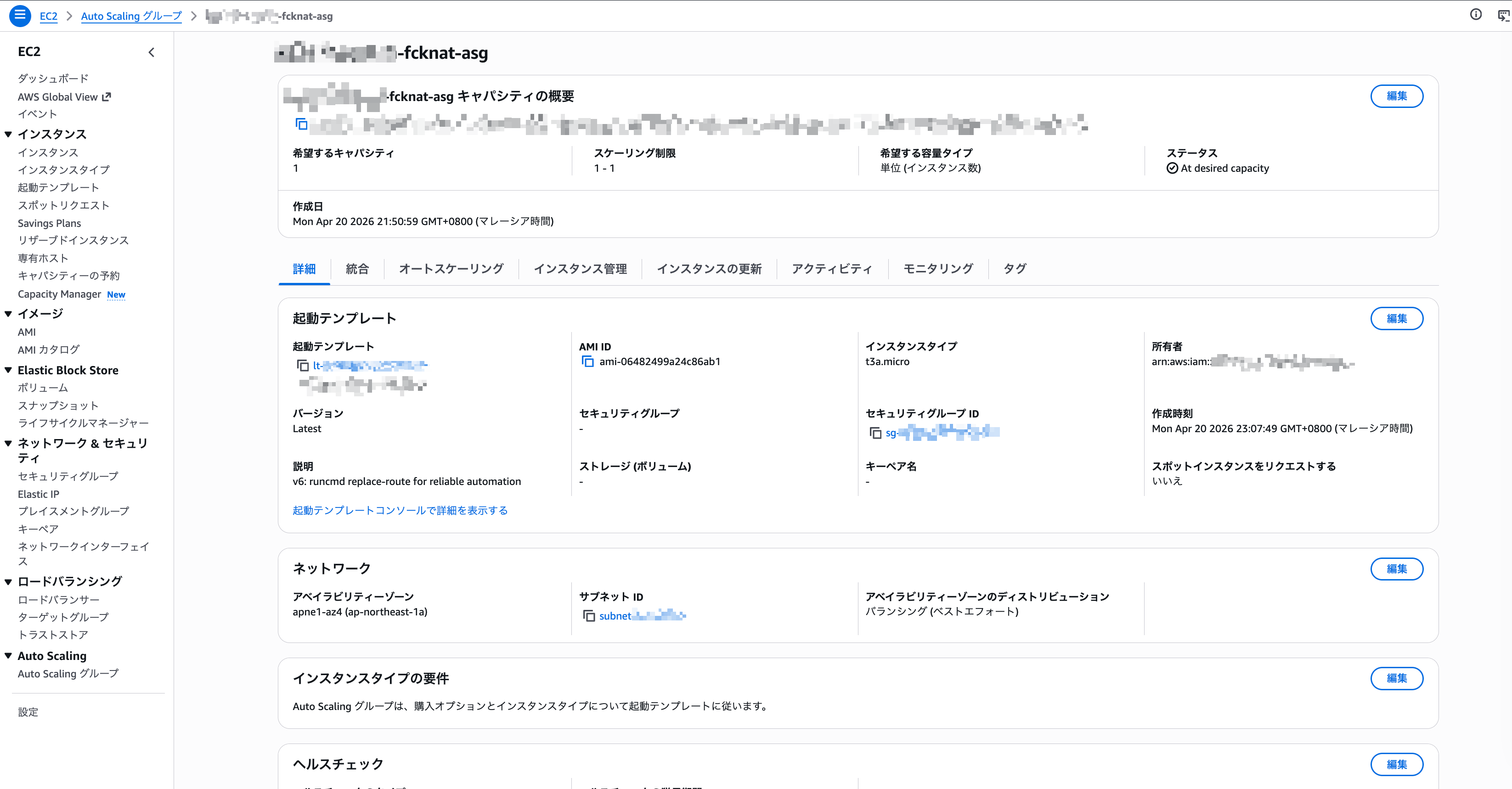
ap-northeast-1a), and it references launch template v6 as Latest.7. Launch Template: Getting Automatic Launches to Work
The Launch Template currently in use is v6, but we rewrote it six times, from v1 to v6, in a single day before ASG self-healing launched instances reliably. Recording what each version was trying to fix makes it easier for anyone building a similar setup to avoid the same pitfalls, so we share them here based on the Description field.
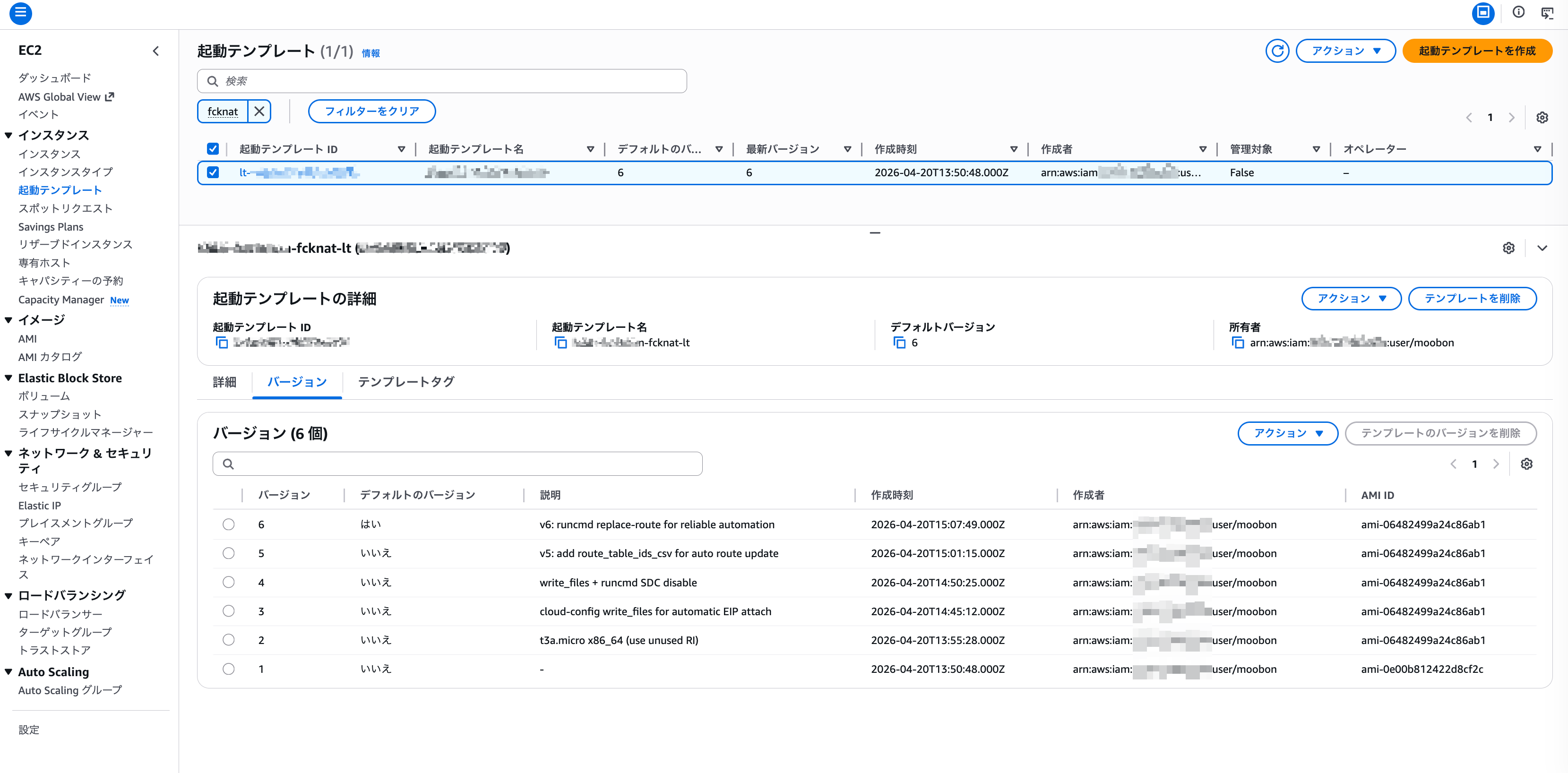
| Ver | Description | Created at |
|---|---|---|
| 1 | (initial version / no description) | 13:50:48 |
| 2 | t3a.micro x86_64 (use unused RI) | 13:55:28 |
| 3 | cloud-config write_files for automatic EIP attach | 14:45:12 |
| 4 | write_files + runcmd SDC disable | 14:50:25 |
| 5 | v5: add route_table_ids_csv for auto route update | 15:01:15 |
| 6 | v6: runcmd replace-route for reliable automation ← current | 15:07:49 |
7-1. v2 → v3: automatic EIP attachment via cloud-config
Up to v2, we attached the EIP manually. The problem was that when ASG self-healing relaunched the instance, the EIP wasn't automatically attached to the new one. In v3, we switched to embedding eip_id into /etc/fck-nat.conf via write_files, which fck-nat.service reads at boot.
7-2. v3 → v4: moving the Source/Destination Check disable to runcmd
By v3 the EIP was attaching automatically, but to work as a NAT appliance, the Source/Destination Check has to be disabled. v4 handled this by running aws ec2 modify-instance-attribute --no-source-dest-check in the cloud-config runcmd at boot.
7-3. v4 → v5: trying automatic route table updates (route_table_ids_csv)
The fck-nat AMI provides a mechanism for automatically updating route tables via route_table_ids_csv in fck-nat.conf. We tried it in v5, but in our setup, there were cases where the update was delayed depending on conditions, so we prioritized stable operation and switched to a different approach.
7-4. v5 → v6: stabilizing by calling aws ec2 replace-route directly
In the current v6, we switched to calling aws ec2 replace-route directly in the cloud-config runcmd to rewrite 0.0.0.0/0 to the instance's own ENI. By not relying on the AMI's option and handling everything in shell while fetching metadata via IMDSv2, the behavior became easier to follow and troubleshooting failures became simpler. The route now points to the new instance within seconds of launch, and it runs reliably.
"Even when the AMI offers a built-in option, writing it yourself in shell you can actually read leads to fewer operational incidents in the end." That's what we were left with after rewriting it six times in one day. Convenience features like route_table_ids_csv run as a black box whose internals you can't easily inspect, which makes troubleshooting hard when something unexpected happens. Transparency of behavior makes a big difference to your peace of mind in production.
8. When fck-nat Is Not a Good Fit
So far this article has leaned toward the upsides of fck-nat, but the fundamental premise is this: if cost isn't a concern, NAT Gateway is far safer and much easier to operate. Managed, automatically redundant, automatically scaling, zero operational burden: these are exactly what you trade away with fck-nat. Especially if any of the following conditions apply, don't adopt the setup in this article; just use NAT Gateway.
8-1. Spiky or large-scale traffic
While NAT Gateway scales automatically on the AWS side, fck-nat's bandwidth is fixed by the instance type you choose. You can move to a larger instance type, but changing it causes downtime, and once you need high-bandwidth instances, the cost advantage disappears. For systems that need to handle sudden traffic swings, NAT Gateway has the edge.
8-2. Systems that require high availability, since it's a single point of failure
The setup in this article (single instance, single AZ) is, as is, a single point of failure. ASG self-healing recovers it automatically, but you have to accept that outbound traffic stops for the few minutes until the new instance launches. For requirements such as less than one hour of downtime per year, consider an AlterNAT-style failover architecture (running your own NAT as the primary with Lambda-driven failover to NAT Gateway on failure). We concluded that "a few minutes of interruption is acceptable" on the premise that "if fck-nat fails, only requests that need outbound traffic will error out, and requests that don't need external communication are unaffected," and adopted it in a single AZ.
Systems where "outbound traffic is small to medium, a few minutes of interruption is acceptable, and operating your own EC2 is within tolerance." One-off connections to a SaaS IP allowlist, outbound API calls from internal tools, cutting costs in development and staging environments: these are the reliable sweet spots. The case in this article fit the same profile: "limited outbound traffic, not many ECS tasks, but a static IP is an absolute requirement."
9. Operational Caveats and Room for Improvement
So far we've written on the premise that "fck-nat works in production," but our current setup still has room for improvement. We're sharing these points candidly so that anyone copying the setup knows about them in advance.
9-1. Why we went single-AZ, and its limits
With fck-nat, traffic will definitely stop during an AZ outage (the instance in the affected AZ goes down, and the ASG isn't set up to launch one in another AZ). We chose a single AZ because the target system's SLA was "a few minutes of interruption is acceptable; recovery from an AZ outage is best effort."
Depending on your requirements, you should specify multiple AZs in the ASG's VPCZoneIdentifier so it launches in another AZ during an AZ outage, or run an independent fck-nat stack with its own EIP per AZ (the latter increases the number of static IPs you need to register).
9-2. Metrics from cwagent_enabled=true are nowhere to be found
We set cwagent_enabled=true in /etc/fck-nat.conf, but we can't find any fck-nat custom metrics (such as network statistics in the CWAgent namespace) in CloudWatch Metrics. We haven't yet confirmed whether this is due to how the AMI starts cwagent or a missing IAM cloudwatch:PutMetricData permission, so this also remains on our list of improvements.
9-3. The extra responsibility of self-managing
OS patching and AMI version upgrades, which you never had to think about with managed NAT Gateway, become your operational responsibility with fck-nat. When a new fck-nat AMI is released, the team needs a shared procedure for updating the Launch Template and rolling the ASG (though with min=max=1, that just means "take it down and bring it back up").
Afterword
This article is an implementation record from one of the systems MOOBON operates, where we ditched NAT Gateway and replaced it with fck-nat. Requirements to "pin the outbound IP" land on engineering teams from time to time, but searching mostly turns up articles that say "set up a NAT Gateway," and we felt there was surprisingly little first-hand information covering the alternatives from both an implementation and an operations perspective. We'd be glad if this article gives you a bit more to go on when making that call.
For a comprehensive roundup of AWS cost optimization, see our companion article How We Found and Recovered $310/Month in “Hidden Fixed Costs” on AWS . Replacing NAT Gateway with fck-nat is one of the 10 tactics introduced there.
If you want to take a serious look at your AWS cost structure itself, also check out the AWS Cost Analysis Tool published by MOOBON. For design reviews, cost assessments, or operational design support, feel free to reach out at info@moobon.jp.
Frequently Asked Questions
QCan't I just attach an EIP directly to the ECS task to fix the outbound IP? Do I really need a separate NAT appliance like fck-nat?
It's possible under certain conditions, but with today's recommended ECS setup you run into a lot of walls. If you use the EC2 launch type with bridge or host network mode and attach an EIP to the EC2 host, container outbound traffic goes through the host's NAT (MASQUERADE), so the outbound IP is pinned to that EIP. However, with the awsvpc network mode (the modern ECS recommendation, which lets you apply a Security Group per task), each task gets its own ENI, so the host's EIP has no effect on container traffic. Fargate doesn't support attaching an EIP directly to a task ENI either; the only option is the dynamic public IP you get by placing tasks in a public subnet, which doesn't meet a static IP requirement. On top of that, the structural disadvantages add up: running multiple tasks usually means multiple EC2 hosts and therefore "multiple static IPs" (more SaaS allowlist entries to manage); you end up placing ECS tasks in a public subnet, which tends to conflict with security requirements; and handling EIP reassignment when the ASG spreads across AZs ends up reinventing fck-nat on the ECS host side. For small use cases such as "a single EC2 host / bridge mode / one task", it works as a no-NAT-appliance solution. But if your premise is multiple tasks, private isolation, and consolidating egress onto a single static IP, building a separate NAT appliance (NAT Gateway or fck-nat) keeps the operational design simpler.
QCan I keep NAT Gateway but reduce NAT data processing charges by sending logs directly to S3 instead of using awslogs?
Technically, yes. If you run Fluent Bit as a sidecar with ECS FireLens and use the `s3` output plugin to PUT logs directly to S3, the logs are stored without going through NAT as long as you have an S3 Gateway Endpoint, which structurally drives NAT data processing charges close to zero. The official AWS `amazon/aws-for-fluent-bit` image ships with the s3 output plugin. There is a trade-off in searchability, though. The real-time searches and operational investigations you used to do with CloudWatch Logs Insights get replaced by queries through Athena / S3 Select once you switch to direct S3 delivery, which are slower to spin up and less nimble. If your team frequently asks "show me the error logs right now", searchability takes a significant hit. Another practical option is to add an Interface Endpoint for `com.amazonaws.<region>.logs`. It costs AZ × $0.014/h ≈ $10/month per AZ, lets you keep using the awslogs driver as is while bypassing NAT, and preserves CloudWatch Logs searchability. As a rule of thumb: if you want to minimize operational overhead, go with the Interface Endpoint ($10/AZ/month); if you want to cut transfer volume as much as possible, go with FireLens + direct S3 delivery. In MOOBON's case covered in this article, we went the fck-nat route to eliminate data processing charges entirely, but for systems that stay on NAT Gateway, both options above are valid choices.
QIs fck-nat safe for production use? What kind of availability SLA should I expect?
AWS-managed NAT Gateway is automatically redundant within each AZ and backed by a 99.99% availability SLA. With fck-nat in a single-instance configuration, traffic stops if that instance goes down. Even with self-healing via an Auto Scaling Group (min=max=desired=1), there is an outage of a few minutes until the new instance boots and the route switches over. At MOOBON, we use it for systems whose requirements are "a few minutes of interruption is acceptable, in exchange for lower cost and operational transparency." For systems that require, say, less than one hour of downtime per year, we recommend a multi-AZ self-managed NAT setup with Lambda-based route switching (such as AlterNAT), or simply running managed NAT Gateways across multiple AZs.
QWhich instance type should I choose for fck-nat: ARM (t4g.nano) or x86_64 (t3a.micro)?
For a new deployment, the sensible choice is the ARM (Graviton) t4g.nano recommended by the fck-nat project. It's the cheapest option (around $3/month), and for this use case, where the Linux kernel handles NAT, ARM vs. x86_64 compatibility is never an issue. MOOBON uses the x86_64 t3a.micro purely for company-specific reasons: we had spare x86_64 Reserved Instances and wanted to put them to use. If you don't have RIs, or you're deploying in a new account, we recommend t4g.nano.
QDoes switching from an existing NAT Gateway to fck-nat cause downtime?
The route switches over the moment you change the 0.0.0.0/0 target in the private subnet's route table from the NAT Gateway ID to the fck-nat ENI ID, so the cutover itself usually takes about one to a few seconds. However, if the timing of attaching the EIP to fck-nat and the timing of the SaaS-side IP allowlist update get out of sync, there will be a window where outbound traffic is rejected. At MOOBON, we minimized operational downtime with this sequence: (1) allocate a new EIP and associate it with fck-nat, (2) ask the destination SaaS to add the new EIP to their allowlist (while keeping the old one), (3) switch the route table, and (4) delete the old NAT Gateway and release the old EIP. If the SaaS allowlist update takes a while, it's safest to set a grace period during which both the old and new paths remain valid.
QHow do you handle security patches and version upgrades for the fck-nat AMI?
The fck-nat AMI publisher account (568608671756) publishes each new release as a new AMI ID. At MOOBON, we update with a rolling procedure: (1) periodically check for new AMI releases, (2) create a new Launch Template version with the new AMI ID, (3) switch the ASG's Launch Template version reference to the new one, and (4) terminate the existing instance (the ASG then launches a new instance from the new AMI). Because of the min=max=desired=1 setup, a truly zero-downtime rolling update isn't possible, and traffic stops for the few minutes it takes the new instance to come up. If you need zero-downtime updates, design a separate blue/green process that switches between two fck-nat stacks.
QIn a single-AZ setup, what happens to outbound traffic during an AZ outage?
In the single-AZ setup described in this article, outbound traffic stops if the AZ it runs in (ap-northeast-1a in our case) fails. If you specify multiple AZs in the ASG's VPCZoneIdentifier, a new instance launches in another AZ during an AZ outage and traffic recovers, but you should assume outbound traffic will be down for the several to a dozen or so minutes it takes to launch. If you need zero interruption even during an AZ outage, it's more robust to run an independent fck-nat stack with its own EIP in each AZ and give each AZ its own route table, or to run managed NAT Gateways across multiple AZs.